Data Management Glossary nnn
-
A
- Active Storage
- Adaptive Data Management
- AI Agents
- AI and Corporate Data
- AI Compute
- AI Data Extraction
- AI Data Governance
- AI Data Ingestion
- AI Data Leakage
- AI Data Management
- AI Data Pipelines
- AI Data Preparation
- AI Data Workflows
- AI Inferencing
- AI Infrastructure
- Air Gap
- Alternate Data Streams (ADS)
- Amazon (AWS) S3 Intelligent Tiering
- Amazon FSx
- Amazon Glacier (AWS Glacier)
- Amazon S3 (AWS S3)
- Amazon S3 Glacier Instant Retrieval
- Amazon Tiering
- Analytics-driven Data Management
- Application Programming Interface (API)
- Archival Storage
- Archiving
- Artificial Intelligence (AI)
- AWS DataSync
- AWS Lambda
- AWS Snowball
- AWS Storage
- Azure Data Box
- Azure NetApp Files
- Azure Storage
- Azure Tiering
-
C
- Capacity Planning
- Carbon footprint
- Carbon Usage Effectiveness
- Chain of Custody
- Chargeback
- Checksum
- Cloud Archiving
- Cloud Cost Optimization
- Cloud Costs
- Cloud Data Analytics
- Cloud Data Growth Analytics
- Cloud Data Management
- Cloud Data Migration
- Cloud Data Storage
- Cloud File Storage
- Cloud Migration
- Cloud NAS
- Cloud Object Storage
- Cloud Storage Gateway
- Cloud Tiering
- CloudPools
- Cold Data
- Common Internet File System (CIFS)
- Compression
-
D
- Dark Data
- Data Analytics
- Data Archiving
- Data Backup
- Data Center Consolidation
- Data Center Emissions
- Data Classification
- Data Curation
- Data Governance
- Data Hoarding
- Data Indexing
- Data Lake
- Data Lakehouse
- Data Lifecycle Management
- Data Lineage
- Data Literacy
- Data Management
- Data Management for AI
- Data Management Policy
- Data Migration
- Data Migration Chain of Custody
- Data Migration Plan
- Data Migration Software
- Data Migration Warm Cutover
- Data Mobilization
- Data Orchestration
- Data Protection
- Data Retention
- Data Retrieval
- Data Services
- Data Silos
- Data Sprawl
- Data Storage
- Data Storage Costs
- Data Storage Management Services (DSMS)
- Data Storage Optimization
- Data Storage Tags
- Data Tagging
- Data Tiering
- Data Transfer
- Data Virtualization
- Deduplication
- Deep Analytics
- Dell PowerScale
- Dell PowerScale SmartPools
- Department Showback
- Digital Business
- Digital Pathology Data Management
- Direct Data Access
- Director (Komprise Director)
- Disaster Recovery
- Dynamic Data Analytics
- Dynamic Links
-
E
-
F
-
G
-
H
-
I
-
K
-
M
-
N
-
O
-
P
-
R
-
S
- S3
- S3 Data Migration
- S3 Intelligent Tiering
- Scale-Out Grid
- Scale-Out Storage
- Secondary Storage
- Sensitive Data Detection
- Shadow AI
- Shadow IT
- Sharding
- Shared-Nothing Architecture
- Showback
- Smart Data Workflows
- SmartPools
- SMB Data Migration
- SMB protocol (Server Message Block)
- Solid State Drives (SSDs)
- Storage Area Network (SAN)
- Storage Array
- Storage as a Service
- Storage as a Service (STaaS)
- Storage Assessment
- Storage Costs
- Storage Efficiency
- Storage Insights
- Storage Metrics
- Storage Pool
- Storage Reclamation
- Storage Refresh
- Storage Tiering
- Stubs
- Sustainable Data Management
- Symbolic Link
- System Metadata
-
U
- Unstructured Data
- Unstructured Data AI
- Unstructured Data Analytics
- Unstructured Data Classification
- Unstructured Data Governance
- Unstructured Data Management
- Unstructured Data Migration
- Unstructured Data Preparation
- Unstructured Data Storage
- Unstructured Data Tiering
- Unstructured Data Workflows
- Unstructured Metadata
Hot Data
Hot data is business-critical data that needs to be accessed frequently and resides on primary storage (NAS).
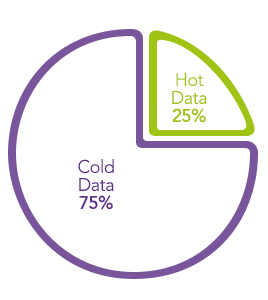
Hot data is considered to be of high value and importance. This type of data is typically stored in fast memory, such as RAM, to ensure quick and efficient access. Examples of hot data include frequently used databases, in-memory caches, and real-time data streams.
The term Hot Data is used in data management to refer to data that is frequently accessed or in high demand. The term Cold Data or Cold Data Storage refers to data that is infrequently accessed. The distinction between hot and cold data is essential for storage efficiency, especially when it comes to optimizing storage and retrieval processes in various systems as well as optimizing data storage costs. Hot data is usually stored in high-performance storage systems, such as solid-state drives (SSDs) or in-memory databases, to ensure quick access and response times. This is especially important for applications that require rapid access to frequently used information, such as transactional databases or real-time analytics.
In contrast, less frequently accessed or “cold” data may be stored on slower and more cost-effective storage solutions, such as traditional hard disk drives (HDDs) or archival systems. This tiered storage approach helps organizations balance performance requirements with cost considerations. Managing hot and cold data effectively is part of data lifecycle management, where data is classified based on its importance, access frequency, and other factors to optimize storage resources and overall system performance. Unstructured data management solutions like Komprise that are storage agnostic and do not get in the hot data path are increasingly popular for maximum data storage cost savings and ongoing data value.

Related Terms
Getting Started with Komprise:
- Learn about Intelligent Data Management
- Schedule a demonstration with our team
- Read the latest State of Unstructured Data Management Report
