Data Management Glossary nnn
-
A
- Active Storage
- Adaptive Data Management
- AI Agents
- AI and Corporate Data
- AI Compute
- AI Data Extraction
- AI Data Governance
- AI Data Ingestion
- AI Data Leakage
- AI Data Management
- AI Data Pipelines
- AI Data Preparation
- AI Data Workflows
- AI Inferencing
- AI Infrastructure
- Air Gap
- Alternate Data Streams (ADS)
- Amazon (AWS) S3 Intelligent Tiering
- Amazon FSx
- Amazon Glacier (AWS Glacier)
- Amazon S3 (AWS S3)
- Amazon S3 Glacier Instant Retrieval
- Amazon Tiering
- Analytics-driven Data Management
- Application Programming Interface (API)
- Archival Storage
- Archiving
- Artificial Intelligence (AI)
- AWS DataSync
- AWS Lambda
- AWS Snowball
- AWS Storage
- Azure Data Box
- Azure NetApp Files
- Azure Storage
- Azure Tiering
-
C
- Capacity Planning
- Carbon footprint
- Carbon Usage Effectiveness
- Chain of Custody
- Chargeback
- Checksum
- Cloud Archiving
- Cloud Cost Optimization
- Cloud Costs
- Cloud Data Analytics
- Cloud Data Growth Analytics
- Cloud Data Management
- Cloud Data Migration
- Cloud Data Storage
- Cloud File Storage
- Cloud Migration
- Cloud NAS
- Cloud Object Storage
- Cloud Storage Gateway
- Cloud Tiering
- CloudPools
- Cold Data
- Common Internet File System (CIFS)
- Compression
-
D
- Dark Data
- Data Analytics
- Data Archiving
- Data Backup
- Data Center Consolidation
- Data Center Emissions
- Data Classification
- Data Curation
- Data Governance
- Data Hoarding
- Data Indexing
- Data Lake
- Data Lakehouse
- Data Lifecycle Management
- Data Lineage
- Data Literacy
- Data Management
- Data Management for AI
- Data Management Policy
- Data Migration
- Data Migration Chain of Custody
- Data Migration Plan
- Data Migration Software
- Data Migration Warm Cutover
- Data Mobilization
- Data Orchestration
- Data Protection
- Data Retention
- Data Retrieval
- Data Services
- Data Silos
- Data Sprawl
- Data Storage
- Data Storage Costs
- Data Storage Management Services (DSMS)
- Data Storage Optimization
- Data Storage Tags
- Data Tagging
- Data Tiering
- Data Transfer
- Data Virtualization
- Deduplication
- Deep Analytics
- Dell PowerScale
- Dell PowerScale SmartPools
- Department Showback
- Digital Business
- Digital Pathology Data Management
- Direct Data Access
- Director (Komprise Director)
- Disaster Recovery
- Dynamic Data Analytics
- Dynamic Links
-
E
-
F
-
G
-
H
-
I
-
K
-
M
-
N
-
O
-
P
-
R
-
S
- S3
- S3 Data Migration
- S3 Intelligent Tiering
- Scale-Out Grid
- Scale-Out Storage
- Secondary Storage
- Sensitive Data Detection
- Shadow AI
- Shadow IT
- Sharding
- Shared-Nothing Architecture
- Showback
- Smart Data Workflows
- SmartPools
- SMB Data Migration
- SMB protocol (Server Message Block)
- Solid State Drives (SSDs)
- Storage Area Network (SAN)
- Storage Array
- Storage as a Service
- Storage as a Service (STaaS)
- Storage Assessment
- Storage Costs
- Storage Efficiency
- Storage Insights
- Storage Metrics
- Storage Pool
- Storage Reclamation
- Storage Refresh
- Storage Tiering
- Stubs
- Sustainable Data Management
- Symbolic Link
- System Metadata
-
U
- Unstructured Data
- Unstructured Data AI
- Unstructured Data Analytics
- Unstructured Data Classification
- Unstructured Data Governance
- Unstructured Data Management
- Unstructured Data Migration
- Unstructured Data Preparation
- Unstructured Data Storage
- Unstructured Data Tiering
- Unstructured Data Workflows
- Unstructured Metadata
File Data Tiering
File data tiering is a data storage management technique that automatically moves files from one storage tier to another based on usage patterns and access frequency. The goal of file data tiering is to optimize storage utilization and reduce storage costs by placing frequently used files on high-performance storage and less frequently used files (cold data storage) on lower-performance storage.
Hardware-based tiering, software-based tiering, and cloud-based tiering are three methods of file data tiering. Hardware-based tiering moves files between different types of physical storage devices, such as solid-state drives (SSDs) and hard disk drives (HDDs), within a storage array. Software-based tiering moves files between different types of virtual storage volumes, such as high-performance and low-performance storage pools. Cloud-based tiering moves files between different storage classes within a cloud-based object storage service, such as Amazon S3.
As part of a broader file data management strategy, file data tiering can help organizations improve storage utilization, reduce storage costs, and increase storage performance by automatically placing the right data in the right place at the right time. However, it’s important for organizations to carefully consider their storage requirements and choose a file tiering solution that fits their needs, as not all tiering solutions are appropriate for all environments.
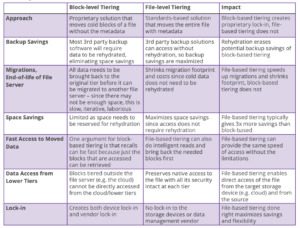
File-Level Tiering vs Block-Level Tiering
Learn the difference between storage-centric block tiering, which moves blocks that can no longer be directly accessed from their new location without vendor software (aka lock-in) and file data tiering, which is what Komprise uses to fully preserve file access at each tier by keeping the metadata and file attributes with the fileāno matter where it lives. Know the difference to make the right cloud tiering choice for your data storage moves.
Related Terms
Getting Started with Komprise:
- Learn about Intelligent Data Management
- Schedule a demonstration with our team
- Read the latest State of Unstructured Data Management Report